

A photo booth gives guests something to do between dinner and dancing, and it leaves you with a stack of candid photos. You don’t need a staff member standing next to it, either. This guide shows how to set up a photo booth from Rent My Wedding’s DIY kit: what comes in the box, where to put it, which booth style to choose and how guests get their pictures. It works for weddings, New Year’s Eve parties, birthdays, Mitzvahs, quinceañeras and company events.
Key takeaways
- The booth is fully DIY: guests tap a touchscreen, pose for three photos and get them right away.
- Every kit includes a camera with a stand, a set of props, unlimited digital photos, live sharing and an online gallery.
- Setup is simple: attach the monitor to the stand, plug it in and let the touchscreen guide each guest.
- Choose a Standard booth for classic 3-photo strips or an Animated booth for looping GIFs.
How a DIY photo booth works
A DIY booth runs itself. Once it is set up, a touchscreen walks each guest through three steps:
- Tap to start the booth.
- Get ready for three photos.
- Get the photos online.
That’s it. Guests press start, count down “3, 2, 1” and the booth does the rest. Because it is self-serve and completely unattended, you skip the cost of an attendant, and the booth can run all night while you enjoy the party.
How to set up a photo booth at your venue
Setup starts when the package arrives. Rent My Wedding schedules each order to arrive at least two days before your event, so you have time to open the boxes and do a practice run at home or at the venue. The booth ships in 2 small packages, which makes it easy to carry in, and setup instructions come with every order.
You set everything up yourself; the booth is completely DIY and very easy to use. Here is the basic order:
- Pick the spot. Choose a wall near the dance floor or bar, where guests pass often, with an outlet close by.
- Put up the backdrop. If you added one, set it against the wall and leave a few steps of open floor in front of it.
- Build the stand. Attach the monitor to the stand and face it toward the backdrop.
- Plug in and power on. The touchscreen shows the start screen, and guests take it from there.
- Take a test photo. Send yourself one by email or text to check the angle and the sharing.
You don’t need Wi-Fi for any of this. The booth sends photos using its own built-in data. The photo booth page also lists the three steps guests follow.
Small touches that help
- Keep cords out of walkways, or tape them down.
- Set the props on a small table beside the booth.
- Leave a sign with the three steps for guests who are new to it.
- Check on the booth once or twice during the night.
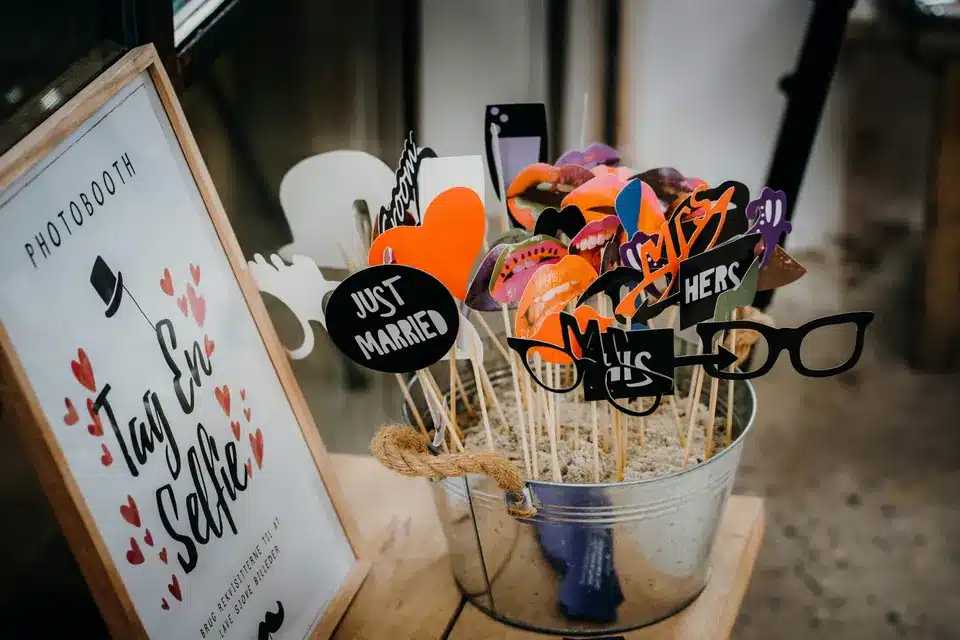
For theme ideas by event type, see photo booth ideas for weddings and parties.
What comes in the DIY photo booth kit
Every kit is packed so you can set it up without extra shopping. According to the photo booth page, the package includes:
- A camera with a stand
- A set of props, such as mustaches and lips
- Unlimited digital photos
- Live sharing by email, text and social media
- An online gallery with all of the event’s photos
You can also add a custom design or logo on the photos, an 8 x 12 ft backdrop, an inflatable booth with lights or a linen canopy booth; compare them on the all photo booths and accessories page. If you want a fabric or sequin look behind the camera instead, browse the backdrop rentals.
Standard booth or animated GIF booth?
Rent My Wedding offers two booth types, and both are DIY.
Standard Photo Booth. This booth takes a classic photo strip with 3 still images. The strips are digital, so guests can share them right away, and they are uploaded to the online gallery. It is a good fit for weddings, birthdays and company events.
Animated Photo Booth. This booth creates a short, looping GIF, similar to a “boomerang” clip. These motion clips are made for social media and give guests a fun keepsake. Copies are digital only.
Pick Standard if you want photos that feel like a traditional booth. Pick Animated if your guests love posting to social media and you want something with movement.
How guests get their photos
Guests choose to receive their photo by email or text. The messages are sent instantly, and each one has buttons for sharing to social media.
All photo strips also go to an online gallery. You can keep the gallery private or share the link with guests after the event. That makes it easy to collect every photo in one place without asking people to send them to you.
Adding a monogram or logo
You have two design options. The Standard Design lets you customize one of Rent My Wedding’s templates. The Premium Design lets you send your own logo or work with the company’s graphic designers on custom artwork.
Ordering, delivery and return
Orders are placed online, and there is no minimum, so you can rent just the booth or pair it with lighting. The rental period is 5 days, and no security deposit is required.
After the party, repack the booth in the same boxes and attach the prepaid return label. Drop it at any FedEx location within two days after the event, or schedule a FedEx pickup. Returns must be handed in at a physical FedEx location, not left in a FedEx drop box. Since there is no attendant to book and you now know how to set up a photo booth, the main decisions are your booth type, your add-ons and your event date.
Want a booth for your event?
Share your date and guest count, and the team can help you pick a booth and add-ons.
FAQ
Do I need an attendant to run the photo booth?
No. Rent My Wedding’s booths are DIY, self-serve and completely unattended. Guests tap the touchscreen, pose for three photos and receive them online.
Does the photo booth need Wi-Fi?
No. Photos are sent by email or text using data built into the booth, so no Wi-Fi is needed at the venue.
When does the photo booth arrive, and how long can I keep it?
Orders are scheduled to arrive at least two days before the event. The rental period is 5 days, and you return the booth to FedEx within two days after the event using the prepaid label. Returns must be handed in at a physical FedEx location, not left in a FedEx drop box.
People Also Ask
How much does it cost to rent a photo booth?
Cost depends on the booth type and any add-ons, such as a backdrop or a custom design. For a current price, request a quote or start an order from the photo booth page. Rent My Wedding’s rental prices include free shipping both ways within the continental U.S.
How do you rent a photo booth?
With Rent My Wedding, you choose a booth on the photo booth page, select your event date and any add-ons, and check out online. The booth ships to you before the event, and you return it with the prepaid label.
What is included in a photo booth rental?
It varies by company. Rent My Wedding’s kit includes a camera with a stand, a set of props, unlimited digital photos, live sharing by email, text or social media, and an online gallery.


