
At a company event, people tend to stand with the colleagues they already know. A photo booth gives them a reason to mix, laugh and leave with something to share. A corporate photo booth also puts your brand on every picture that goes out on social media. This guide covers booth types, branding, placement and the lighting around the booth for holiday parties, launches, conferences and team nights.
Key takeaways
- The booths are self-serve and completely unattended, so no staff member has to run them.
- Guests get their photos by email or text, sent with built-in data on the booth, with no Wi-Fi needed.
- The Premium Design option lets you submit your own custom logo or work with the graphic designers.
- An online gallery collects every photo strip and can be private or shareable with guests.
Why a booth works at a company event
A photo booth gives guests something to do between the speeches and the food. Groups from different teams line up together, and the photos give your social media and internal channels content from the night.
Think about the goal of the event before you order:
- Holiday parties and team nights. The point is fun and connection, so props and silly poses matter most.
- Product launches. You want the brand front and center on every image.
- Conferences and trade shows. A booth can draw visitors to your space, and the gallery keeps every photo in one place.
- Client appreciation events. A polished enclosure and a clean design feel more like a thank you.
Choosing a corporate photo booth
Rent My Wedding offers two photo booth options. The Standard booth takes a photo strip with 3 high-quality images, and the page lists it as perfect for weddings, birthdays and corporate events. The Animated booth creates a looping GIF, similar to Instagram’s Boomerang effect, which suits a brand that wants short clips for social media. The Animated booth provides digital copies only.
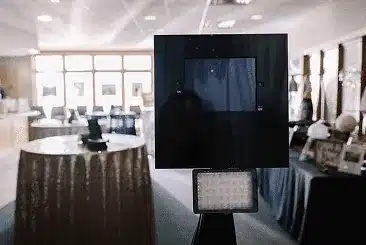
Both booths are DIY-friendly: self-serve, completely unattended and simple to use. A touchscreen prompts guests to take photos, and the booth arrives in 2 small packages. Our DIY photo booth guide walks through setup step by step.
Put the brand on every photo
The photo booths page offers two ways to add a logo or monogram to the photo. The Standard Design option lets you customize one of the templates. The Premium Design option lets you submit your own custom logo, or work with the graphic designers to create custom artwork. You add these design options at checkout.
A few tips for a branded strip:
- Use a clean version of the logo, with enough contrast to read on a small phone screen.
- Add the event name and the date, so the photo still makes sense months later.
- Ask the marketing team to approve the design before the event, not on the day.
Sharing and the gallery
Guests receive their photo by email or text. The messages are sent instantly using built-in data on the photo booth, so no Wi-Fi is needed. When guests receive the email or text, it has social media buttons to share the photo on Instagram, Facebook or Twitter.
Every photo strip goes to an online photo gallery, which can be either private or shareable with guests. For an internal event, a private gallery keeps the photos inside the company. For a public launch, a shareable gallery helps the photos travel further.
Placement, backdrops and enclosures
Put the booth where people already gather, such as near the bar or between the reception area and the main room, but not in a doorway. Leave space for a line and for small groups posing together.
For an enclosure, the photo booth add-ons include an inflatable booth with lights and a linen canopy booth. The inflatable booth is 8 feet tall, 8 feet wide and 8 feet long, inflates within minutes, and its built-in lights can change the booth to any color, so you can match your brand colors. For more backdrop ideas, read our guide to photo booth backdrops.
Light the room around it
The booth looks best in a room that matches it. Uplights wash the walls in any color at the push of a button, so the room can carry your brand colors too. A monogram light can project your logo on a wall or the floor near the booth, which helps guests find it. Our guide to corporate event lighting covers logo projection and color choices in more detail.
Ordering, delivery and returns
You can schedule your rentals well ahead of time, which helps when the event goes through a budget approval. There is no minimum order. Your rental package will arrive at least two days before your event, and the rental period is 5 days. Each rental includes setup instructions, and 24/7 support is available. Shipping is free both ways within the continental U.S.
After the event, repack everything in the boxes it came in, attach the prepaid return labels and take them to a physical FedEx location within two days. Never leave them in a FedEx drop box. You can find more answers on the FAQs page.
A corporate photo booth does not need a vendor on site. Choose the booth type, put the brand on the strip, place it where people gather and let your team take it from there.
Planning a company event?
Tell us the date, the guest count and your brand colors, and the team can help you choose a booth and a design.
FAQ
What is the Premium Design option for the photo strips?
It lets you submit your own custom logo, or work with the graphic designers to create custom artwork for the photo. The Standard Design option lets you customize one of the templates instead. You add either option at checkout.
Can guests share booth photos on social media?
Yes. Guests get their photo by email or text, and the message has social media buttons to share it on Instagram, Facebook or Twitter. The messages are sent with built-in data on the booth, so no Wi-Fi is needed.
Can we change the booth color to match our brand?
With the inflatable booth add-on, yes. Its built-in lights can change the booth to any color, and a remote control is provided.
People Also Ask
What are good photo booth ideas for a corporate event?
Brand the photo strip with your logo and the event name, place the booth where people already gather, light the room in your brand colors and use a private gallery for internal events.
Should a company holiday party have a photo booth?
A booth gives guests from different teams a reason to mix, and the photos give you content from the night. A self-serve booth also means no staff member has to run it.


